Discrete Choices, Continuous Growth: My OS Switch
A Step-by-Step Migration Guide with Backups, Distros, and Lessons Learned

Yuletide greetings! With winter break upon us, my work buddies told me to do something fun this break. Of course, that means I decided that now is a good time to clean up my digital life, which includes switching from Windows to Linux on my laptop. I had tried Ubuntu before as a dual boot setup, and this time I will be trying out some other distros too. If you want to follow along, make sure you have a way to back up your local files (on a cloud or better yet, on an external SSD or burn to DVDs).
Reasons to Ditch Windows
Undoubtedly, Windows is still king in the realm of PC Gaming, but I mostly game on my PlayStation 5 and Nintendo Switch, and my PC is just for development / data science tinkering now. The current reasons are based around Microsoft leaning hard towards embedding AI, and the overall removal of choice in using local accounts, ultimately amount to relinquishing control to our devices.
The reasons for moving away from Windows can be summarized in a couple of quotes. First, from an article in the Verge:
“In the beginning you might see the agent make some mistakes, or encounter some challenges when trying to use some really complex applications,” explains Navjot Virk, corporate vice president of Windows Experiences. An AI agent making mistakes using a computer doesn’t fill me with confidence[.]
Second, from a Futurism article:
[W]ith […] Copilot Vision, the AI will be able to see everything that happens on your screen so it can give context-based recommendations and tips. This is supposed to pair with Copilot Actions, which allow the AI assistant to perform tasks on your local machine, like editing folders […] this requires ceding an alarming level of access to the AI — with your permission, of course. And evidence suggests this will be a hard sell. Microsoft’s AI-powered Recall feature, which constantly took screenshots of your desktop, received tons of backlash for its obvious security flaws, like recording your Social Security number, and storing these recordings in a completely unencrypted folder.
Preparation
The overarching process to prepare for new install (or reinstall) of an operating systems on any PC includes two steps. (a.) backup existing data, since it will all be wiped, and (b.) ensure access to the relevant new operating system.
Backup Data
First, we will back up all personal data and our work on Windows, preferably using the 3-2-1 rule. This means 3 copies (1 originals with 2 back ups), 2 media types (SSD or HDD), and 1 copy off-site. This rule was originated from Peter Krogh in his 2009 book The DAM Book: Digital Asset Management for Photographers. For now, I save items to google drive (offsite), on an external SSD (monthly) and on a flash drive (frequently used files).
Usually: grab all unique folders/files in
C:\Users\_username_(whatever your username might be), and export bookmarks from the browser(s) and saving it on an external drive. Back up passwords too (strongly recommend switching to a good password manager like KeePassXC instead of Chrome).In case we want to go back to using Windows later, get the Windows 11 key in case I need to reinstall without internet access (or for use the key on another device later). Use the following command in PowerShell and store this in some place not on the laptop:
(Get-WmiObject -query ‘select * from SoftwareLicensingService’).OA3xOriginalProductKeyRecord hardware specifications for potential trouble shooting later on.
Record wifi passwords, etc, if needed.
Optional bonus: Refresh our back up of other systems (like OneDrive or Google Drive) while you’re at it.
Choose a (few) distributions and repair tools
There’s thousands of Linux distributions, and I won’t get too deep into what each one is here because we can write a book on the topic.
Choose a distro either by asking some friends about Linux (prepare to spend a few hours chatting), looking on reddit/online (prepare to spend a few hours browsing) or use Distro Chooser.
Be clear about what you want in an operating system. Personally, I want:
OS for daily use, and can do anonymous browsing, and has live mode to test drive the OS before install
I prefer a free distribution, and some proprietary drivers are fine
The result of my quiz and some personal additions yield the following distros:
Fedora (Wikipedia): The testing ground for Red Hat Enterprise Linux
OpenSUSE tumbleweed (Wikipedia): developed by the openSUSE Project.
Manjaro (Wikipedia): “Taking the raw power and flexibility of Arch Linux and making it more accessible for a greater audience.”
Linux Mint (Wikipedia): “Easy to use, fast and comfortable.”
Ubuntu (Wikipedia): “The secure, modern operating system used by millions”
Laptop Config
Restart your computer, and boot into BIOS. Basic Input/Output System helps manage foundational configurations, before the operating system loads.
Change the boot order so that USB flashdrive is first. This is key to make sure the later steps would work.
While Ventoy supports secure boot, this can cause issues when we’re customizing the operating system. Disabling secure boot can make the process smoother.
Ventoy Setup
Set up a multi-bootable USB using Ventoy, an open-source, multi-platform tool that will allow you to create a bootable USB. uniquely, this tool allows us to load multiple iso files into the drive, which is perfect for using this as a way to test various Linux distributions and repair tools. This allows for easy and customizable bootable USB, where you are not wasting any extra space. Note: read the documentation for the specific distro, some specialty distros like Tails may specify that you should use a default bootable USB creation tool.
Make sure to use checksums to verify the download, since Ventoy is a critical file used to create a bootable USB drive.

Checksums as of 2025-12-28 Use the following command in PowerShell:
C:\> certUtil -hashfile <PATH_TO_FILE> <HASH_ALGORITHM>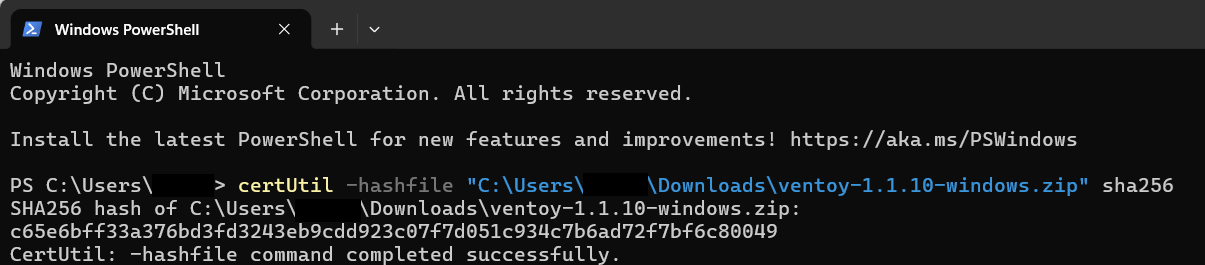
Alternatively, you can use this PowerShell cmd-let:
Get-FileHash <PATH_TO_FILE>
For potentially going back to Windows, download a copy of the windows 11 iso from Microsoft directly.
Get our isos (I included Windows and Ubuntu in case I want to go back to the familiar operating systems.)
Optional: Put some repair tools on the USB too! I added: Hiren’s BootCD PE (Windows recovery), SystemRescue (Linux recovery), Rescuezilla (drive cloning), GPartedLive (partitioning), MemTest86 (hardware memory test), Boot-Repair-Disk-64bit (fixing GRUB/MBR/EFI), ShredOS (shred data)
Optional Steps: I always put a README.txt type file in my creations, it’s a good habit to document our work in case we forget. Cosmetic: we can change the look and feel of ventoy using GRUB themes. We can also put the isos into separate folders, and select tree view as an option for Ventoy for easier navigation. We can also set up persistence for some live distros, which I did for Ubuntu.


Test Driving Linux Distros
Once all this is set up, test drive the Linux distros by live booting them. Test the following items and troubleshoot. Record experiences in finding the wiki/manuals if troubleshooting (are they available?) Check forums (are users friendly? helpful?)
Does the Linux distribution boot? (if not, first verify the checksum directly through ventoy, and potentially turn off secure boot settings in BIOS).
Does the mouse or touchpad, and keyboard work? If the laptop has a touch screen, does that work as an input?
Are you able to connect to the internet? Check Wi-Fi network and connect. Open up a browser and visit https://linux-hardware.org/ and follow instructions there to do a probe. (The anonymous data is loaded to the site.) Try connecting to bluetooth with a headset and pull up a video on your browser and confirm sound and video output properly.
Kernel Panic Issues: Fedora, OpenSUSE, ShredOS
Both of these give a kernel panic for me, which led to some investigation. The specific issue is that when booting these three OSs, in normal, GRUB or memdisk, we see a kernel panic. The error was VFS: Unable to mount unknown-block(0,0). OpenSUSE was a bit more verbose in the error (CPU mismatch). There may be something odd with these three and their interactions with Ventoy. After digging for two days, I decided to stick with the distros that are currently working.
Final Verdict (for me): Manjaro
As a first test, to make sure the Ventoy bootable USB worked, I first tried the trusty Ubuntu. I set up dual boot with 20.04 LTS and Windows 10 a few years ago during graduate school, and currently 24.04 smoothly booted as expected, and all hardware functioned — unsurprising but still impressive.
After tinkering with Ubuntu and Linux Mint live boots a bit, I decided to go with Manjaro, which also booted flawlessly. The main reason is that I have never tried an Arch based distro before — Ubuntu took my Linux virginity, and Linux Mint is dependable but is based on Ubuntu. The deciding factor was that Arch seemed like it has a deeper learning curve.
Next post will be about setting up Manjaro on HP Envy x360 15-ew0xxx laptop.
References
Abdullahi, A. (2025, April 4). Windows 11 Forces Microsoft Account Sign In & Removes Bypass Trick Option. Tech Republic. https://www.techrepublic.com/article/news-windows-11-setup-microsoft
Carrasqueira, J. (2022, September 1). How to find the specs on your Windows 11 PC. XDA. https://www.xda-developers.com/how-to-find-specs-windows-11-pc/
Don’t let google manage your passwords. (2023, April 30). PCMAG. https://www.pcmag.com/opinions/warning-dont-let-google-manage-your-passwords
Import chrome bookmarks & settings—Google chrome help. (n.d.). Retrieved January 1, 2026, from https://support.google.com/chrome/answer/96816?hl=en
Kernel panic. (2025). In Wikipedia. https://en.wikipedia.org/w/index.php?title=Kernel_panic&oldid=1325130623
Krogh, P. (2009). The dam book: Digital asset management for photographers (2. ed). O’Reilly.
Landymore, F. (2024, December 17). Microsoft’s ai “recall” feature caught screenshotting your social security number. Futurism. https://futurism.com/the-byte/microsoft-ai-recall-security
Linux distribution. (2025). In Wikipedia. https://en.wikipedia.org/w/index.php?title=Linux_distribution&oldid=1330254748
Linux mint. (2025). In Wikipedia. https://en.wikipedia.org/w/index.php?title=Linux_Mint&oldid=1329378310
List of Linux distributions. (2025). In Wikipedia. https://en.wikipedia.org/w/index.php?title=List_of_Linux_distributions&oldid=1330223145
Manjaro. (2025). In Wikipedia. https://en.wikipedia.org/w/index.php?title=Manjaro&oldid=1329879656
Opensuse. (2025). In Wikipedia. https://en.wikipedia.org/w/index.php?title=OpenSUSE&oldid=1329943402
Optical disc image. (2025). In Wikipedia. https://en.wikipedia.org/w/index.php?title=Optical_disc_image&oldid=1316910230
Personal data. (2025). In Wikipedia. https://en.wikipedia.org/w/index.php?title=Personal_data&oldid=1326557220
sdwheeler. (n.d.). Getting started with powershell—Powershell. Retrieved January 1, 2026, from https://learn.microsoft.com/en-us/powershell/scripting/learn/ps101/01-getting-started?view=powershell-7.5
Systemrescue—System rescue homepage. (n.d.). Retrieved January 1, 2026, from https://www.system-rescue.org/
Tangermann, V. (2024, June 6). Windows feature that records everything you do can easily be hacked. Futurism. https://futurism.com/the-byte/windows-recall-hacked
Ubuntu. (2025). In Wikipedia. https://en.wikipedia.org/w/index.php?title=Ubuntu&oldid=1329094733
University, G. (n.d.). Change the boot order in BIOS | Linux#. Retrieved January 1, 2026, from https://geek-university.com/change-the-boot-order-in-bios/, https://geek-university.com/change-the-boot-order-in-bios/
Ventoy. (n.d.-a). Retrieved January 1, 2026, from https://www.ventoy.net/
Warren, T. (2025, October 16). Microsoft wants you to talk to your PC and let AI control it. The Verge. https://www.theverge.com/news/799768/microsoft-windows-ai-copilot-voice-vision-launch
What is a 3-2-1 Backup Strategy? | Seagate US. (n.d.). Seagate.Com. Retrieved January 1, 2026, from https://www.seagate.com/blog/what-is-a-3-2-1-backup-strategy/
windows-driver-content. (n.d.). Secure boot. Retrieved January 1, 2026, from https://learn.microsoft.com/en-us/windows-hardware/design/device-experiences/oem-secure-boot